Why VPS Hosting is Perfect for Growing CRM Systems? It’s the key to scaling your CRM without breaking the bank or sacrificing performance. This in-depth guide reveals how VPS hosting offers unparalleled flexibility and control, enabling your CRM to handle massive growth while staying secure and reliable.
VPS hosting provides a dedicated slice of server resources, offering more control and performance than shared hosting. This dedicated space allows your CRM system to grow seamlessly, handling increased user traffic and data volumes without hiccups. We’ll explore the technical aspects, scalability strategies, performance optimizations, security measures, and cost-effectiveness to show you how VPS hosting is the ideal solution for your expanding CRM needs.
Introduction to VPS Hosting
VPS hosting, or Virtual Private Server hosting, is like renting a tiny apartment in a massive data center. Instead of sharing resources with dozens of other tenants, you get a dedicated slice of server resources, allowing you to control and customize your hosting environment. This dedicated space is crucial for growing CRM systems, as they often demand more resources and stability than shared hosting can provide.
Think of it as having your own private server, without the massive upfront investment and management headaches.This dedicated resource allocation offers unparalleled control over your CRM system’s performance and stability, which is essential for scaling and handling increased data and user traffic. Unlike shared hosting, where resources are pooled among multiple users, VPS hosting allows you to allocate specific amounts of CPU, RAM, and storage to your CRM, optimizing its performance and ensuring consistent speed and reliability.
VPS Hosting vs. Shared Hosting
The fundamental difference between VPS and shared hosting lies in resource allocation and control. Shared hosting is like a communal apartment, where everyone shares the same kitchen, bathroom, and living space. Your CRM system might get slowed down by other users’ activities. VPS hosting, on the other hand, provides a dedicated environment, akin to your own apartment, where you have control over the resources allocated to your CRM system.
This dedicated space ensures consistent performance, even during peak usage. A critical factor in the decision-making process for growing CRM systems is the need for predictable performance, which VPS hosting delivers.
Technical Aspects of Virtualization
VPS hosting leverages virtualization technology to create multiple isolated environments on a single physical server. This technology essentially creates a virtual machine (VM) that acts as a dedicated server, isolated from other VMs. This isolation is vital for security and stability. Think of it like creating multiple rooms in a house, each with its own power supply and utilities.
If one room malfunctions, it doesn’t affect the others. This isolation prevents the performance degradation issues commonly associated with shared hosting, protecting your CRM from the actions of other users. The security features of virtualization contribute to a secure and stable environment.
Comparison of Hosting Types
| Feature | VPS Hosting | Dedicated Server | Cloud Hosting |
|---|---|---|---|
| Scalability | Good, adaptable to growing needs. | High, but requires significant upfront investment and management. | Excellent, resources dynamically adjust based on demand. |
| Performance | Generally good, with better performance than shared hosting. | Excellent, dedicated resources translate to optimal performance. | High performance, but dependent on the cloud provider’s infrastructure. |
| Cost | Mid-range, a good balance between performance and cost. | High, significant upfront investment. | Cost varies, often more flexible than dedicated servers, but less predictable than VPS. |
This table provides a basic comparison of VPS hosting, dedicated servers, and cloud hosting. The optimal choice depends on specific needs and budget. For example, a growing CRM system might start with VPS hosting and transition to a dedicated server as needs expand, leveraging the flexibility of VPS hosting for its initial growth phases.
Scalability for Growing CRM Systems
Your CRM is the heart of your business, but as your company grows, so does the data it needs to manage. A poorly-scaled CRM can quickly become a bottleneck, impacting everything from sales efficiency to customer satisfaction. VPS hosting offers a flexible and powerful solution to handle the increasing demands of a growing CRM system, allowing you to scale resources seamlessly without breaking the bank or disrupting your operations.
VPS Hosting vs. Shared Hosting for CRM Growth
Shared hosting, while a great starting point, becomes increasingly limiting as your CRM system expands. The shared resources on a shared hosting plan can be overwhelmed by the growing data volume, user traffic, and processing demands of a more complex CRM. This can lead to performance slowdowns, downtime, and ultimately, a negative impact on your business.
VPS hosting, on the other hand, provides dedicated resources, enabling you to allocate more CPU, RAM, and storage as your CRM needs evolve. This dedicated environment ensures consistent performance, even during peak usage, guaranteeing your CRM continues to function optimally, powering your business forward.
Scaling Resources on a VPS
One of the key advantages of VPS hosting is the ability to adjust resources as your CRM system grows. This isn’t just about adding more storage; it’s about fine-tuning CPU and RAM allocation to optimize performance. You can upgrade your VPS plan to accommodate more demanding CRM features and ensure your system remains responsive even as user bases and data volumes increase.
A significant example of scaling is adding more RAM to handle larger datasets. If your CRM begins to struggle with complex queries or large data imports, adding more RAM can dramatically improve response times. Likewise, increasing CPU power can speed up processing tasks, such as data analysis or report generation, critical for CRM operations.
Real-World Examples of VPS Success
Many businesses have successfully transitioned their CRM systems to VPS hosting as they’ve grown. A small e-commerce company, for instance, might start with a basic shared hosting plan for their initial CRM. As their customer base and sales volume increased, they migrated to a VPS to accommodate the increased processing load and ensure their CRM remained responsive and reliable.
The ability to scale resources on the VPS allowed them to avoid the limitations of shared hosting and maintain high-quality service.
Another example might be a growing SaaS company using a CRM to manage customer relationships. Their initial CRM might have functioned well on shared hosting, but as their customer base exploded, the shared resources became a bottleneck. Switching to a VPS enabled them to maintain responsiveness and handle the data volume, ensuring their customers continued to receive the high-quality service they expected.
VPS Hosting Packages and Resource Allocation
| Package | CPU | RAM (GB) | Storage (GB) | Monthly Cost (estimated) |
|---|---|---|---|---|
| Starter | 1 Core | 2 GB | 20 GB | $25 |
| Growth | 2 Cores | 4 GB | 50 GB | $50 |
| Enterprise | 4 Cores | 8 GB | 100 GB | $100 |
This table illustrates a simplified example of VPS hosting packages and their resource allocations. Real-world pricing and specifications vary greatly depending on the provider and the specific features you require. It’s crucial to carefully consider your CRM’s current and projected needs when selecting a VPS package.
Performance and Reliability
VPS hosting isn’t just about
- slightly* better performance; it’s about a
- massive* leap in reliability and responsiveness for your CRM, especially as your user base explodes. Think of it as upgrading your CRM’s engine from a sputtering four-cylinder to a roaring V8. This translates directly into a smoother user experience and a happier customer base.
VPS hosting’s dedicated resources allow your CRM to handle peak usage periods without hiccups, delivering consistent performance even during high-traffic events. This is crucial for CRMs, where real-time data access and quick response times are paramount. You’ll avoid frustrating slowdowns, lost leads, and ultimately, a decline in sales conversions.
Dedicated Resources and Response Times
Your CRM benefits significantly from dedicated server resources. Each VPS instance gets a slice of the server’s power, memory, and storage, free from the limitations of shared hosting. This dedicated allocation translates into faster response times for CRM users, ensuring they don’t experience frustrating delays while accessing crucial information or performing essential tasks. This dedicated resource allocation is key to maintaining a responsive and efficient CRM system.
For example, a large enterprise CRM managing millions of contacts and transactions can experience significantly improved performance with a dedicated VPS, avoiding bottlenecks and ensuring a seamless user experience.
High Availability and Uptime
VPS hosting architectures are designed with redundancy in mind, contributing to high availability and uptime. This is achieved through features like redundant network connections, multiple servers, and automatic failover mechanisms. If one component fails, the system automatically switches to a backup, minimizing downtime and ensuring your CRM remains operational. This continuous uptime is critical for maintaining customer relationships and ensuring business continuity.
Think of it as having a backup generator for your server—ensuring your CRM is always running.
Factors Affecting CRM Performance on a VPS
Several factors influence the performance of a CRM system on a VPS. These include:
- Server specifications: CPU cores, RAM, and storage capacity directly affect the system’s ability to handle concurrent requests. Insufficient resources lead to slowdowns and performance bottlenecks. Ensure you choose a VPS with sufficient specifications to handle your expected user load.
- Network bandwidth: High traffic demands substantial bandwidth. Insufficient bandwidth results in slow data transfer and laggy performance. Verify that your VPS plan offers enough bandwidth to accommodate your anticipated user volume.
- Database configuration: Optimizing your database queries and indexes significantly impacts performance. Inefficient database queries can drastically slow down CRM operations. A poorly optimized database can lead to slower response times, impacting user experience and potentially business operations.
- Application code: Inefficient or poorly written code can cause performance issues. Regularly reviewing and optimizing the CRM application’s code can significantly enhance performance. Outdated or poorly written code will inevitably create performance issues.
Troubleshooting Performance Issues
Troubleshooting performance problems on a VPS requires a systematic approach. First, identify the source of the issue by monitoring resource utilization, checking error logs, and analyzing user feedback. Tools like server monitoring dashboards and application performance monitoring (APM) tools can be used to pinpoint the cause of performance bottlenecks. Collect detailed information about the nature of the issue, including specific error messages, timestamps, and user actions.
Backups and Disaster Recovery Strategies
Regular backups and a robust disaster recovery strategy are essential for VPS hosting a CRM. Data loss can cripple a CRM system, impacting customer data and potentially costing a business significant revenue. Implementing a robust backup strategy, including daily or even hourly backups, ensures data integrity and the ability to restore data in case of a system failure or data corruption.
Implement off-site backups to protect against localized disasters. Develop a detailed disaster recovery plan that Artikels the steps to take in case of a major outage, including restoring data and bringing the system back online. This ensures your CRM is protected from data loss and system failures.
Security for CRM Data: Why VPS Hosting Is Perfect For Growing CRM Systems
Protecting your CRM data is paramount, especially as your business grows. A robust security strategy is crucial, and VPS hosting offers a significant advantage over shared hosting in this regard. Choosing the right provider and implementing proper security measures on your VPS is key to maintaining data integrity and avoiding costly breaches.VPS hosting offers a much higher level of security compared to shared hosting, where multiple users share the same server resources.
VPS hosting is a game-changer for scaling CRM systems. You’re constantly adding users and data, and a robust hosting solution is crucial for smooth operations. This translates directly to optimizing customer experience with CRM server hosting, which is key to long-term growth. Check out Optimizing Customer Experience with CRM Server Hosting for more on that.
Ultimately, a flexible and powerful VPS solution is the best way to ensure your CRM stays ahead of the curve and provides a stellar user experience for your customers.
This separation of resources isolates your CRM data, making it less vulnerable to attacks originating from other users. VPS hosting allows you to customize security settings and implement measures specific to your CRM needs.
Security Measures Offered by VPS Providers, Why VPS Hosting is Perfect for Growing CRM Systems
VPS providers typically offer a range of security features to protect your data. These include robust firewalls, intrusion detection systems, and regular security audits. Many providers also offer dedicated IP addresses, enhancing your system’s security posture. They may also offer options for data encryption, both in transit and at rest, depending on the provider.
How VPS Improves Data Security Compared to Shared Hosting
VPS hosting offers several advantages over shared hosting when it comes to security. The isolation of resources on a VPS limits the potential impact of a security breach on other users’ data. If a user on a shared hosting platform is compromised, their actions can potentially impact other accounts on the same server. This isn’t the case with VPS hosting, where your data is isolated.
Moreover, VPS hosting gives you greater control over your server’s configuration, allowing you to tailor security settings to your specific needs. This level of control is often not possible with shared hosting.
Importance of Choosing a Reputable Provider
Selecting a reputable VPS provider is critical for secure CRM data hosting. Reputable providers invest in robust security infrastructure and have a proven track record of handling security incidents. Look for providers with publicly available security certifications and transparent security policies. Their experience in handling sensitive data is a key indicator of their commitment to your security.
Avoid providers with a lack of clear security policies or a history of security breaches.
Best Practices for Securing a VPS Hosting Environment
Implementing strong security practices on your VPS is crucial. Regularly update your operating system and applications to patch security vulnerabilities. Employ strong passwords and enable multi-factor authentication (MFA) for all accounts accessing the VPS. Regularly monitor your system logs for suspicious activity. Restrict access to your VPS using firewalls and access controls.
Implementing these practices will significantly enhance your security posture.
Example Security Features Table
| VPS Provider | Firewall | Intrusion Detection | Data Encryption | Dedicated IP |
|---|---|---|---|---|
| Provider A | Yes | Yes | Yes (SSL/TLS) | Yes |
| Provider B | Yes | Yes | No | Yes |
| Provider C | Yes | No | Yes (AES-256) | No |
Note: This is a simplified example. Features and availability may vary depending on the specific provider and plan. Always refer to the provider’s documentation for detailed information.
Cost-Effectiveness for Growth

So, you’re building a killer CRM, and your user base is exploding. But with that growth comes a crucial question: how do you keep your hosting costs manageable without sacrificing performance? VPS hosting offers a surprisingly cost-effective solution for scaling your CRM, especially as your needs evolve. Let’s dive into why.VPS hosting isn’t just about saving money; it’s about smart spending.
You pay only for the resources you use, unlike traditional shared hosting where you’re sharing resources with other websites. This pay-as-you-go model is incredibly flexible and allows you to scale up or down as your CRM’s demands change. It’s like renting a room in a house—you only pay for the space you need, not the entire house.
Comparing VPS Hosting Costs
Traditional shared hosting often offers a low entry point, but it’s a fixed cost. If your CRM starts getting slammed with requests, you might find yourself constantly upgrading to a more expensive plan, or even worse, your performance suffers. A VPS, on the other hand, allows you to adjust resources on the fly, ensuring a smooth experience for your users while staying within a budget.
Consider this: a small VPS plan might cost $20-$50/month, while a comparable shared hosting plan might be $10/month. But as your CRM grows, the VPS becomes a far more economical option. A dedicated server might offer the highest performance but also comes with the highest cost, which is often not feasible for a rapidly growing CRM.
Pay-as-You-Go Flexibility
The beauty of VPS hosting is its pay-as-you-go structure. Need more CPU power or RAM during peak hours? You can easily adjust your resources without committing to a larger, more expensive plan. Need less during off-peak hours? Scale down.
This dynamic scaling is crucial for a growing CRM because user demand fluctuates. This is a far cry from the rigid contracts of dedicated servers or the limited scalability of shared hosting.
Optimizing Resource Utilization
Effective resource management is key to minimizing VPS hosting costs. Monitoring resource usage (CPU, RAM, disk I/O) is essential to spot potential bottlenecks and ensure your CRM runs smoothly without wasting resources. Tools like monitoring dashboards and server management software help you stay ahead of the curve. For instance, optimizing database queries and caching frequently accessed data can significantly reduce the load on your server, leading to substantial cost savings.
Furthermore, implementing server-side caching, using a content delivery network (CDN), and regularly backing up data can also reduce resource demands.
Total Cost of Ownership (TCO)
The total cost of ownership goes beyond just the monthly hosting fee. Consider factors like software licenses, security measures, backups, and potential maintenance costs. While VPS hosting might have a slightly higher initial setup cost than shared hosting, the long-term cost savings from its scalability and flexibility often outweigh this. For instance, a small business using a VPS can potentially save thousands over time by avoiding the need for frequent upgrades or server migrations as the business grows.
The ability to scale resources effectively translates to reduced downtime, fewer errors, and improved customer satisfaction, which ultimately contributes to a better return on investment.
Managing and Maintaining a VPS
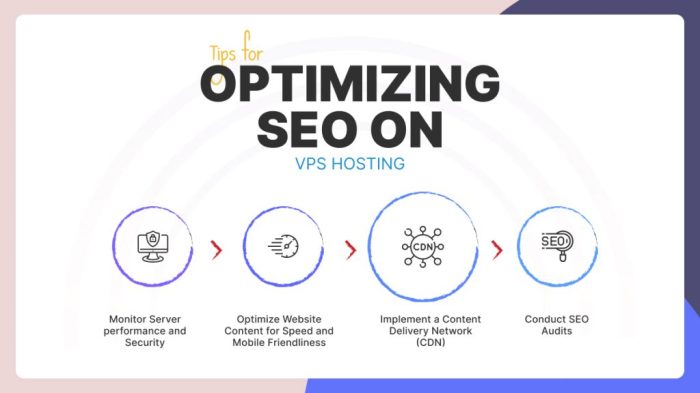
VPS hosting offers incredible flexibility, but it also comes with the responsibility of managing the server. This isn’t rocket science, but it does require understanding the tasks involved and the right tools. Without proper management, your CRM could suffer performance issues, security vulnerabilities, or even complete downtime. So, let’s dive into the nitty-gritty of keeping your VPS running smoothly.Effective VPS management is crucial for a high-performing CRM.
It’s not just about setting it up; it’s about ongoing maintenance, monitoring, and optimization to ensure your CRM system delivers the best possible experience for your users. This involves a range of administrative tasks, the right tools, and a well-defined strategy.
Administrative Tasks Involved in Managing a VPS
VPS administration involves a diverse set of tasks, from basic system maintenance to complex security configurations. These tasks ensure optimal performance and prevent potential issues. Key administrative duties include:
- System Monitoring: Tracking server resources like CPU usage, memory, and disk space is essential for proactive issue identification. Regular monitoring tools are vital for preventing performance bottlenecks and ensuring smooth CRM operation. A healthy VPS is a happy CRM.
- Software Updates: Keeping operating systems, applications, and security software up-to-date is crucial for patching vulnerabilities and ensuring the system’s security. Outdated software is a major security risk. Regular updates ensure your CRM is protected from emerging threats.
- Backup and Recovery: Implementing a robust backup strategy is paramount. Regular backups allow for quick recovery in case of data loss or system failures, safeguarding your CRM data. Think of backups as insurance for your CRM data.
- Security Management: Configuring firewalls, implementing access controls, and regularly auditing security logs are critical for preventing unauthorized access and protecting sensitive CRM data. A secure VPS is a safe CRM.
Tools and Software Needed for Effective VPS Management
Selecting the right tools can streamline the management process and ensure efficiency. Here are some essential tools:
- Remote Access Tools: SSH (Secure Shell) is a standard protocol for secure remote access to the VPS. PuTTY and SecureCRT are popular clients for SSH access. Remote access allows you to control your server from anywhere with a secure connection.
- Monitoring Tools: Tools like Nagios, Zabbix, and Prometheus monitor server performance, identifying potential issues before they impact your CRM. Real-time monitoring ensures you’re always on top of things.
- Control Panels: Control panels like cPanel, Plesk, and DirectAdmin simplify server management. These panels offer user-friendly interfaces for tasks like managing accounts, installing software, and configuring settings. Control panels automate many management tasks.
- Backup Software: Backup solutions like Rclone or rsync automate the process of backing up data and configurations. These tools allow you to schedule regular backups and ensure data integrity. Automated backups save time and reduce the risk of data loss.
Different Management Options for VPS
Various management options are available, catering to different needs and skill levels.
- Remote Access: This method allows you to connect to the VPS remotely using tools like SSH. This gives you full control over the server, but requires technical expertise. It’s a powerful option for those comfortable with the command line.
- Control Panels: These user-friendly interfaces offer a graphical way to manage the VPS. They automate many tasks, making them suitable for users with less technical expertise. They simplify tasks significantly.
- Managed VPS Services: Managed VPS providers handle the day-to-day maintenance tasks. This is an excellent option for users who lack the time or technical expertise to manage their VPS. This frees up your time to focus on your CRM.
Best Practices for Maintaining a VPS Environment
Implementing these best practices ensures optimal performance and security:
- Regular Updates: Regularly update the operating system, applications, and security software to patch vulnerabilities and maintain security.
- Regular Backups: Implement a robust backup strategy to safeguard data and ensure quick recovery in case of issues.
- Security Audits: Regularly audit security configurations and logs to identify and address potential security risks.
- Resource Monitoring: Continuously monitor server resources to identify and address performance bottlenecks.
Step-by-Step Guide for Setting Up a VPS for a CRM System
Setting up a VPS for a CRM involves these steps:
- Choose a VPS Provider: Select a reputable provider offering adequate resources and security.
- Choose a VPS Plan: Select a plan that meets your CRM’s resource needs and budget.
- Install the Operating System: Follow the provider’s instructions to install the operating system on the VPS.
- Install Necessary Software: Install any necessary applications and CRM software.
- Configure Security: Configure firewalls, access controls, and other security settings.
- Set Up Backups: Establish a backup strategy to protect your CRM data.
- Test the Setup: Thoroughly test the CRM to ensure proper functionality and performance.
Integrating CRM with VPS
Integrating your CRM software with a VPS hosting environment is crucial for smooth operation and scalability. It’s not just about slapping your CRM onto the server; it’s about configuring the VPS to perfectly match your CRM’s needs, ensuring peak performance and minimizing downtime. This involves careful planning and understanding the nuances of both your chosen CRM and your VPS setup.
VPS hosting is a game-changer for scaling CRM systems. It’s crucial for handling increased data and user demands as your business grows. This directly translates to faster response times, and that’s why reducing latency in your CRM system with server hosting like Reducing Latency in CRM Systems with Server Hosting is key. Ultimately, a robust VPS solution ensures your CRM stays lightning-fast, keeps your customers happy, and keeps your business growing strong.
The right integration unlocks the full potential of your CRM, allowing it to handle increasing data volumes and user demands without hiccups.
CRM Software Compatibility
Different CRMs have varying resource requirements and database structures. Understanding these differences is key to selecting the right VPS configuration. For example, a CRM with a complex reporting suite will require more processing power than one primarily focused on lead management. Some popular CRM systems like Salesforce, HubSpot, and Zoho CRM have varying degrees of compatibility with different VPS configurations.
Factors such as the server’s CPU, RAM, and storage capacity directly influence the CRM’s performance.
VPS Configuration for CRM Optimization
Optimizing your VPS for your CRM is a critical step. Proper resource allocation is paramount. This includes adjusting CPU allocation, RAM, and storage space based on the specific CRM’s needs and expected growth. A VPS with ample resources can handle peak loads without compromising performance. For instance, if your CRM anticipates a significant increase in users, you might need to upgrade your VPS’s RAM to accommodate the growing demands.
Furthermore, choosing the right operating system (like Linux or Windows) for your VPS can influence the compatibility and performance of your CRM.
Best Practices for CRM Performance
Several best practices ensure optimal CRM performance on a VPS. Firstly, regularly monitoring resource usage is essential. Tools like server monitoring software can provide insights into CPU, memory, and network bandwidth consumption, helping you identify potential bottlenecks. Secondly, ensure proper backups are in place to protect your valuable CRM data. Regular backups safeguard your system against data loss, whether from hardware failure or accidental deletion.
Thirdly, implementing caching mechanisms can significantly boost page load times and improve user experience. A well-configured caching system can reduce server load and enhance overall CRM responsiveness.
Comparison of CRM Systems and VPS Suitability
| CRM System | Ideal VPS Configuration (CPU/RAM/Storage) | Suitability for Small Businesses | Suitability for Large Enterprises ||—|—|—|—|| Salesforce | High CPU, High RAM, High Storage | Moderate (Requires careful resource allocation) | Excellent (Handles large volumes of data and users) || HubSpot | Medium CPU, Medium RAM, Medium Storage | Excellent (Scalable and manageable) | Very Good (Handles moderate to high volumes of data) || Zoho CRM | Medium CPU, Medium RAM, Medium Storage | Excellent (Easy to set up and use) | Good (Can handle a large amount of data but may require upgrades) |
A well-configured VPS can be the difference between a CRM system that smoothly handles increasing demands and one that struggles to keep up.
Conclusive Thoughts
In conclusion, Why VPS Hosting is Perfect for Growing CRM Systems is evident. It offers a robust, scalable, and secure environment to handle the increasing demands of a growing CRM. By understanding the technical aspects, scalability options, and security measures, you can confidently choose VPS hosting for your CRM, ensuring a smooth transition and long-term success.
FAQ Guide
Q: What’s the difference between VPS and shared hosting?
A: Shared hosting provides resources from a single server shared by multiple users, limiting performance. VPS hosting allocates dedicated resources to your CRM, providing greater control and performance.
Q: How much does VPS hosting cost?
A: VPS hosting costs vary depending on the resources allocated. It’s typically more expensive than shared hosting but often more cost-effective than dedicated servers in the long run, especially for growing businesses.
Q: Can I easily scale my VPS resources?
A: Yes, VPS hosting allows you to scale CPU, RAM, and storage resources as your CRM grows. This flexibility is critical for accommodating increasing data volumes and user demands.
Q: What security measures are typically offered with VPS hosting?
A: Reputable VPS providers offer various security features, including firewalls, intrusion detection systems, and regular security updates. You should always verify these details with your provider.