
How Server Hosting Influences CRM User Engagement is crucial for CRM success. Poor hosting can cripple user experience, leading to lost leads and decreased conversions. Fast, reliable servers are the bedrock of a thriving CRM, impacting everything from login speed to data loading times. This deep dive explores the intricate connection between server hosting types, network performance, security, and the ultimate user experience.
Choosing the right server hosting solution is paramount for CRM success. Different hosting types (shared, VPS, dedicated, cloud) each have unique strengths and weaknesses, and the optimal choice depends on your specific CRM needs. Factors like user volume, data size, and budget all play a role. Understanding these factors and how they relate to user engagement is key to maximizing your CRM’s potential.
Server Hosting Infrastructure and its Impact
Choosing the right server hosting for your CRM is crucial for user engagement. A slow, unreliable, or underpowered server can lead to frustrated users, lost productivity, and ultimately, a negative impact on your bottom line. Understanding the different hosting options and their impact on performance is key to maximizing your CRM’s effectiveness.Server hosting options vary significantly in their capabilities and costs, influencing the speed, reliability, and scalability of your CRM system.
This difference directly impacts user experience, which is a key element in fostering a positive and productive environment.
Different Server Hosting Types
Various server hosting types cater to different needs and budgets. Understanding the technical specifications and performance characteristics of each is essential for selecting the right solution for your CRM.
- Shared Hosting: This is the most affordable option, where multiple websites share the same server resources. It’s ideal for small businesses with low traffic volumes. Technical specifications typically include limited CPU, RAM, and storage resources. Shared hosting environments often struggle with scalability and can experience performance fluctuations due to the shared nature of resources.
- VPS Hosting (Virtual Private Server): VPS hosting provides a dedicated portion of server resources, offering more control and flexibility than shared hosting. Technical specifications involve dedicated CPU, RAM, and storage, allocated to a single user or organization. VPS hosting is often more scalable and reliable than shared hosting, but it is still less powerful and expensive than dedicated hosting.
- Dedicated Hosting: This option provides an entire server dedicated to a single client. It offers the highest level of control and performance. Technical specifications include full control over server hardware, including CPU, RAM, and storage. Dedicated hosting is ideal for large organizations with high traffic volumes and demanding CRM needs. This type of hosting is more expensive than other options.
- Cloud Hosting: Cloud hosting utilizes a network of interconnected servers to provide scalable and flexible resources. Technical specifications are highly dynamic and depend on the specific cloud provider and the resources allocated. Cloud hosting excels in scalability, offering on-demand resource allocation to meet fluctuating demands. It can handle massive increases in traffic with ease.
Performance Characteristics Comparison
The performance of different hosting types directly impacts the CRM user experience. Speed, reliability, and scalability are crucial factors to consider.
- Speed: Shared hosting often experiences slower response times due to resource contention. VPS hosting typically offers improved speed compared to shared hosting, while dedicated hosting provides the fastest response times. Cloud hosting’s speed depends on the specific configuration and load distribution, but it generally performs well in handling peak loads.
- Reliability: Shared hosting is often the least reliable due to the shared nature of the server. VPS hosting is more reliable than shared hosting, while dedicated and cloud hosting offer the highest levels of reliability, often with redundancy built-in to prevent downtime.
- Scalability: Shared hosting is the least scalable, while cloud hosting excels in accommodating increasing traffic demands. VPS and dedicated hosting offer intermediate scalability options, but they are limited compared to the dynamic nature of cloud solutions.
Bottlenecks and Limitations
Different hosting types present varying limitations that can negatively affect CRM user experience.
- Shared Hosting: Performance can be significantly impacted by other users on the same server. Security risks are also a concern as shared servers can be vulnerable to attacks.
- VPS Hosting: Scalability might become a limitation as demands increase. Configuration and maintenance responsibilities are higher compared to shared hosting.
- Dedicated Hosting: The initial cost and ongoing maintenance can be significant. Expertise is needed to manage and troubleshoot issues.
- Cloud Hosting: Depending on the provider, there can be limitations on specific configurations. Downtime is theoretically less frequent, but the risk of outages is still present, albeit minimal.
Cost and Benefits Comparison
The table below illustrates the cost and benefits of each hosting type, highlighting their impact on CRM performance.
| Hosting Type | Cost | Performance | Scalability | Benefits |
|---|---|---|---|---|
| Shared Hosting | Low | Moderate | Low | Affordable entry point |
| VPS Hosting | Medium | High | Medium | Improved performance, control |
| Dedicated Hosting | High | High | High | Maximum performance, control |
| Cloud Hosting | Variable | High | High | Scalability, flexibility |
Server Uptime and Response Time
High server uptime and fast response times are critical for positive user engagement.
- Server Uptime: Consistent uptime minimizes disruptions to user access, preventing lost productivity and frustration. High uptime rates are crucial for a seamless CRM experience.
- Response Time: Fast response times ensure quick loading of CRM functionalities, minimizing user wait times and maximizing efficiency. Slow response times can lead to a poor user experience and decreased productivity.
Network Connectivity and CRM Functionality
Your CRM is only as good as its connection. A sluggish network translates directly into frustrated users, lost productivity, and ultimately, a less effective CRM system. Fast, reliable network connectivity is crucial for a smooth CRM user experience, enabling seamless data access, quick response times, and efficient collaboration. Poor connectivity can lead to significant operational issues, making it critical to understand the impact of network performance on CRM functionality.Robust network connectivity is the lifeblood of a CRM system.
Without a reliable connection, users struggle to access critical data, leading to delays in tasks and a decline in overall efficiency. This, in turn, impacts the ability of your team to leverage the CRM’s full potential, resulting in a less effective system. Investing in a strong network infrastructure is an investment in your CRM’s success.
Network Latency and Bandwidth Limitations
Network latency, the delay in data transmission, and bandwidth limitations, the maximum data transfer rate, directly affect CRM user experience. High latency results in sluggish response times when users access data or perform actions within the CRM. Similarly, low bandwidth can cause delays when uploading or downloading large files, impacting data management and analysis. These limitations can be particularly detrimental to teams reliant on real-time data updates and collaborative workflows.
For example, a video conferencing application using a CRM platform might experience significant disruptions if the bandwidth is insufficient, hindering the ability to share and discuss information effectively.
Optimizing Network Performance
Several measures can optimize network performance and minimize delays within a CRM environment. Implementing a Content Delivery Network (CDN) can significantly reduce latency by distributing content closer to users. Utilizing high-bandwidth connections, such as fiber optic lines, ensures fast data transfer rates, preventing bottlenecks. Regular network monitoring and maintenance are essential for identifying and resolving potential issues promptly.
Employing caching mechanisms can also improve response times by storing frequently accessed data locally, reducing the need for constant retrieval from the server.
Robust Network Infrastructure and CRM Responsiveness
A robust network infrastructure directly impacts CRM responsiveness. A well-designed network architecture with sufficient bandwidth and low latency ensures that users can access and interact with the CRM seamlessly. This translates to faster data retrieval, quicker application responses, and improved overall user experience. A high-performance network enables real-time collaboration and allows users to work effectively together, leading to increased productivity and improved workflow.
Network Protocols and CRM User Interaction
The choice of network protocols significantly influences CRM user interaction. Different protocols offer varying performance characteristics, and understanding these differences is critical for optimal CRM functionality.
| Protocol | Description | Impact on CRM User Interaction |
|---|---|---|
| TCP (Transmission Control Protocol) | Reliable, connection-oriented protocol for guaranteed data delivery. | Ensures data integrity but can introduce slight latency, particularly with large data transfers. |
| UDP (User Datagram Protocol) | Faster, connectionless protocol that prioritizes speed over reliability. | Suitable for real-time applications but can lead to data loss or corruption if not carefully managed. Can be beneficial for some CRM features requiring speed over absolute reliability. |
| HTTP (Hypertext Transfer Protocol) | Standard protocol for transferring web pages and data over the internet. | Crucial for CRM applications that interact with web services. Performance is highly dependent on the underlying network infrastructure. |
| HTTPS (Hypertext Transfer Protocol Secure) | Secure version of HTTP, encrypting data during transmission. | Essential for protecting sensitive CRM data during transmission. Can introduce some latency overhead. |
Security Considerations and User Trust
Building trust with your CRM users hinges on security. It’s not just about the features, but how secure your platform is. Hackers are constantly looking for vulnerabilities, and if your CRM is vulnerable, your users’ trust evaporates. This means choosing the right server hosting environment, implementing robust security measures, and maintaining those measures over time is paramount.User data is sensitive, and protecting it is critical.
Data breaches not only cause financial losses, but also damage your reputation and erode user trust. A robust security strategy is a long-term investment in your CRM’s success.
Security Measures in Different Hosting Environments
Different hosting environments offer varying levels of security. Cloud hosting, for example, often employs multi-layered security protocols, including access controls, firewalls, and intrusion detection systems. Dedicated servers, on the other hand, often allow for greater customization of security configurations. Managed hosting providers frequently handle much of the security maintenance, freeing up resources for your core CRM functions.
Understanding the security protocols of each environment is crucial for selecting the right fit.
Data Security and Integrity Best Practices
Ensuring data security and integrity within a CRM system requires a multifaceted approach. Regular backups are essential to recover from data loss. Strong password policies, including multi-factor authentication (MFA), significantly reduce the risk of unauthorized access. Implementing encryption throughout the system, from data at rest to data in transit, is crucial. Regular security audits and penetration testing identify potential vulnerabilities before they can be exploited.
These measures minimize the chance of data breaches.
Impact of Security Breaches on User Engagement and Trust
Security breaches have a direct and often devastating impact on user engagement and trust. A data breach can result in a significant loss of user confidence. Users may hesitate to provide sensitive information or engage with the platform. This leads to decreased user engagement and ultimately, a loss of revenue. A study by [Insert reputable study source here] found that users are less likely to engage with a CRM system after a data breach, impacting customer retention.
Examples of Server-Side Security Measures
Server-side security measures can significantly enhance user trust. Implementing intrusion detection systems (IDS) can detect and block malicious activities in real-time. Using secure coding practices, which are especially important when developing custom integrations, ensures that the CRM is not vulnerable to common exploits. Employing robust firewalls protects the server from unauthorized access. These proactive measures are vital for preventing data loss and protecting user data.
Importance of Regular Security Audits and Updates
Regular security audits and updates are essential to maintaining a secure CRM system. Security audits should identify vulnerabilities in the system and suggest appropriate fixes. Regular updates address newly discovered vulnerabilities, patching potential security holes. These updates should be implemented promptly to ensure your CRM system is as secure as possible. Failing to update regularly can leave your system exposed to attacks.
Consider the example of [Insert example of a company affected by lack of updates here] which suffered significant financial losses due to a lack of timely updates. Keeping your CRM updated and audited regularly is a key component of maintaining user trust and data security.
CRM Software Integration and Performance
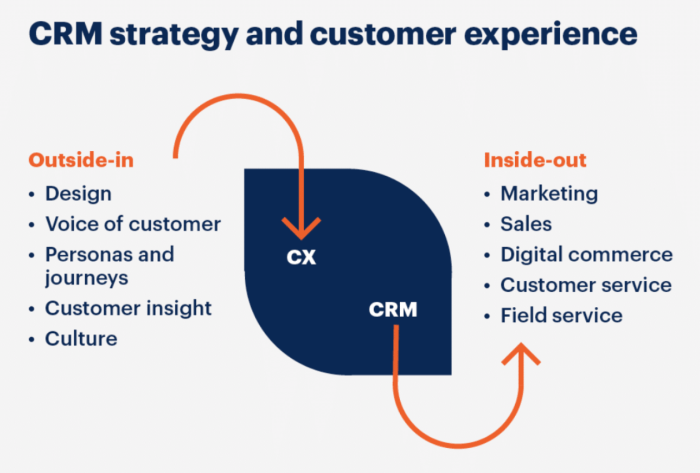
So, you’ve got your killer CRM, but is it actually performing like a rocket ship? Or is it chugging along like a vintage car? A lot depends on how well it integrates with your server hosting setup. Poor performance can lead to frustrating user experience, lost productivity, and ultimately, a dip in the bottom line. Let’s dive into how to optimize your CRM for peak performance.
Server Resource Impact on CRM Performance, How Server Hosting Influences CRM User Engagement
CRM software, like any application, demands resources. The more complex the CRM, the more processing power, memory (RAM), and storage space it needs. A server hosting environment with insufficient resources will result in sluggish response times, frequent application crashes, and ultimately, a negative user experience. High-volume user access to the CRM, particularly during peak hours, will further strain the server, so anticipate these needs when choosing your hosting plan.
Insufficient server resources can translate to slow loading times, delayed responses to user actions, and ultimately, a frustrated user base. This directly impacts user engagement and, consequently, the overall efficiency of the CRM system.
Optimizing CRM Configurations for Different Hosting Types
The specific configuration of your CRM software needs to be tailored to the type of hosting environment you’ve chosen. Cloud-based hosting, for example, often offers scalability and flexibility, allowing you to adjust resources dynamically as needed. Conversely, a dedicated server gives you more control over resource allocation but requires more technical expertise. For cloud hosting, you need to ensure your CRM is configured to take advantage of the dynamic scaling features.
For dedicated servers, a fine-tuned configuration with optimized processes will be crucial. Using the appropriate configuration is essential to get the best performance from your CRM on any hosting environment.
CRM Performance Metrics Based on Hosting
Measuring CRM performance is crucial for understanding the impact of your hosting choices. Key metrics include:
- Average response time: How long does it take for the CRM to respond to user actions? A high average response time can quickly frustrate users.
- Transaction processing speed: How quickly can the CRM handle large volumes of transactions? This is critical for businesses experiencing high growth.
- Error rates: How often does the CRM encounter errors? Frequent errors indicate potential issues with the hosting or the CRM configuration.
- Server resource utilization: How much of the server’s resources are being used by the CRM? High utilization can lead to performance degradation.
- User satisfaction: Surveys and feedback can provide invaluable insights into the user experience related to the hosting choice. High user satisfaction scores correlate with a well-performing CRM.
Monitoring these metrics allows for proactive identification of potential performance bottlenecks and helps to fine-tune the CRM and hosting environment accordingly.
Performance Comparison of CRM Software on Different Hosting Environments
While a definitive, universally applicable table isn’t possible, the performance of a CRM depends heavily on the specific software, the server hosting environment, and the workload. Factors like the number of users, the volume of data, and the complexity of the CRM features all play a role. A simple CRM might perform adequately on a shared hosting environment, but a sophisticated enterprise-level CRM may need a dedicated server for optimal performance.
| CRM Software | Shared Hosting | VPS Hosting | Dedicated Server | Cloud Hosting |
|---|---|---|---|---|
| CRM A (Basic) | Good | Excellent | Excellent | Excellent |
| CRM B (Mid-range) | Fair | Good | Excellent | Excellent |
| CRM C (Enterprise) | Poor | Good | Excellent | Excellent |
This table is a general guideline; actual performance will vary based on specific configurations and usage patterns. Always conduct thorough testing and performance analysis before deploying a CRM in a production environment.
User Experience and Accessibility
So, you’ve got your killer CRM, but if users can’t actuallyuse* it, it’s all for naught. User experience (UX) is the secret sauce that turns potential customers into raving fans. Poor server hosting translates directly into a terrible UX, leading to frustrated users and lost revenue. Let’s dive into how your server choice impacts everything from login speed to overall CRM engagement.Server hosting profoundly affects the user experience, impacting everything from the simple act of logging in to the complex task of analyzing data.
A fast, responsive system breeds happy customers. Conversely, sluggish performance and frequent downtime erode trust and create a negative experience that can drive users away. This section details the crucial link between hosting type and user accessibility, and the vital role UI design plays in mitigating the impact of poor hosting.
Login Speed and Data Loading Time
Fast login times are paramount. Users don’t want to wait. If the login page takes more than a few seconds to load, users will likely abandon the process, opting for a competitor’s CRM that provides a seamless experience. Similarly, slow data loading times for reports or dashboards are a major turn-off. Imagine trying to analyze sales figures while the data takes forever to appear.
This is a major usability problem. A well-optimized server infrastructure ensures rapid data retrieval and immediate display, which keeps users engaged and productive.
Application Responsiveness
CRM applications need to be responsive. Users should be able to navigate menus, enter data, and access information without delays or lags. A sluggish CRM can frustrate even the most patient users. Imagine trying to close a deal while the CRM system repeatedly freezes. The lack of responsiveness directly affects user satisfaction and engagement.
Modern CRM systems demand fast processing power and efficient server architecture to ensure seamless interaction.
Impact on Accessibility for Users in Various Locations
Server location greatly affects user accessibility. A user in Europe shouldn’t experience significantly slower response times than a user in the US. Geographic proximity of the server to the user is crucial for minimizing latency. A user in South America using a CRM hosted in Asia will likely experience a significantly different user experience than one using a CRM hosted in South America.
Hosting in multiple regions allows businesses to provide better service to users worldwide. Latency can significantly impact user experience.
Influence on Customer Satisfaction and Engagement
A smooth, responsive CRM directly impacts customer satisfaction. When users can access information quickly and interact seamlessly, they are more likely to be satisfied and engaged with the platform. Poor UX stemming from inadequate server hosting can quickly sour customer sentiment and lead to churn. Positive user experience is a cornerstone of customer loyalty and business success.
User satisfaction and engagement are highly correlated with CRM performance.
Role of User Interface Design in Mitigating Negative Impacts of Poor Server Hosting
UI design plays a crucial role in masking the effects of poor server hosting. A well-designed interface can compensate for some performance issues. A user-friendly layout with clear navigation can make a significant difference in user satisfaction, even if the underlying infrastructure isn’t optimal. For example, a user interface design can provide a loading indicator to indicate the data is loading, which can improve user experience.
Effective UI design can greatly mitigate the impact of slow server performance.
Examples of User Interface Designs Optimized for Various Server Hosting Conditions
A well-designed UI can subtly guide users through slower processes, making the experience more acceptable. For example, a loading screen with animated graphics can distract the user while data is being loaded. The design should provide visual cues and clear feedback to users. A user interface with intuitive navigation can improve user experience, even on less-than-optimal servers.
An interface optimized for a geographically distributed user base can include features to minimize latency and improve responsiveness.
Scalability and Future Growth
Scaling your CRM server hosting is crucial for future growth. Think about it: your business isn’t static. Customer base expands, data volumes explode, and user demands evolve. If your hosting isn’t flexible enough to keep pace, you’ll hit a wall. A scalable solution allows you to adapt and grow without major disruptions or crippling performance issues.
This means more than just having enough bandwidth; it’s about the architecture, the tools, and the strategy for continuous expansion.
Importance of Scalability for CRM Needs
Scalability in server hosting isn’t just a nice-to-have; it’s a necessity. A system that can’t handle increased user traffic or data volumes will lead to a frustrating user experience. Imagine a CRM system that slows down every time a new customer signs up or a massive batch of data is imported. That’s a recipe for lost productivity and a drop in user engagement.
Scalable hosting ensures your CRM remains responsive and reliable, no matter how much your business grows. Choosing a solution that can handle anticipated growth is critical for sustained success.
Handling Increased User Traffic and Data Volumes
Different hosting options offer varying degrees of scalability. Cloud-based solutions often excel in this area due to their inherent flexibility. You can easily adjust resources like RAM and storage as your needs evolve. For example, AWS, Azure, and Google Cloud Platform all offer robust scaling capabilities, allowing you to add more server instances on demand. Dedicated servers offer more control, but scaling can be more complex and require more technical expertise.
A dedicated server with sufficient initial capacity might be more cost-effective than an initial cloud-based solution for a smaller company.
Effective Scaling of Server Resources
Efficient resource scaling is paramount for avoiding performance degradation. Monitoring key metrics like CPU usage, memory allocation, and network traffic is essential. Tools for performance monitoring and resource allocation should be integral parts of your hosting strategy. Cloud platforms provide built-in tools to dynamically adjust resources. Dedicated server environments require careful planning and management.
For instance, using load balancers can distribute traffic across multiple servers, ensuring smooth performance even under high load. Automated scaling features are critical for avoiding manual intervention.
Planning for Future CRM Growth
A well-defined plan for handling future growth in CRM user base and data volume is crucial. Forecasting user growth and data increases is key. You need to understand your projected growth rate and plan your resource allocation accordingly. Implementing a phased approach, gradually increasing server capacity as needed, is a best practice. This approach avoids overspending and ensures you’re not left scrambling to accommodate unexpected spikes in demand.
For instance, a small business might start with a cloud-based solution and migrate to a dedicated server as their user base expands.
Comparison of Hosting Scalability
| Hosting Type | Scalability | Ease of Scaling | Cost |
|---|---|---|---|
| Cloud (AWS, Azure, GCP) | High | High | Variable, often pay-as-you-go |
| Dedicated Server | Medium to High (with proper planning) | Medium | Generally higher upfront cost |
| Shared Hosting | Low | Very Low | Lowest upfront cost |
This table provides a basic comparison. Specific scalability factors can vary based on the provider, chosen configuration, and overall infrastructure. Always research specific providers and their scalability options to ensure a good fit for your needs. For example, consider the different tiers of cloud services offered by cloud providers to understand the variations in their scalability capabilities.
Cost Optimization and ROI
Choosing the right server hosting for your CRM is crucial for maximizing your return on investment (ROI). It’s not just about the initial cost; you need to consider long-term scalability, performance, and security. A poorly chosen hosting solution can quickly become a significant drain on resources, impacting user engagement and ultimately your bottom line. Let’s dive into how to evaluate costs effectively and optimize your hosting strategy for maximum ROI.
Evaluating Cost-Effectiveness of Hosting Options
A thorough cost analysis is paramount when selecting a CRM server hosting solution. Factors like initial setup costs, ongoing maintenance fees, bandwidth consumption, and potential scalability needs should all be considered. Compare different hosting providers based on their pricing models, features, and support packages. Look beyond the introductory price and evaluate the long-term implications of potential hidden costs.
Optimizing Hosting Costs Without Sacrificing Performance
You can significantly reduce hosting costs without compromising performance or security. Cloud hosting solutions, for example, often offer pay-as-you-go models, which can be more flexible and cost-effective than traditional dedicated servers. Leveraging server virtualization techniques can consolidate resources, potentially lowering your infrastructure footprint. Regular performance monitoring and optimization of your CRM application can also significantly reduce resource consumption, translating to lower costs.
Return on Investment (ROI) Associated with CRM Hosting
Calculating the ROI of different hosting solutions requires a clear understanding of your CRM’s expected usage. Consider factors such as projected user growth, data volume, and peak usage times. Analyze the cost of different hosting options, including cloud solutions and dedicated servers, and project their respective ROI over a specific timeframe. For example, a cloud-based solution might have a lower upfront cost but higher costs as usage spikes.
A dedicated server might be more expensive upfront but potentially more cost-effective in the long run if usage is consistent.
Factors Influencing the Overall Cost of Server Hosting
Numerous factors influence the overall cost of server hosting for a CRM system. These include the type of hosting (shared, dedicated, cloud), required storage space, processing power, bandwidth, and security measures. Geographic location of the server can also play a role in costs, as can the provider’s pricing model and any associated maintenance agreements. It’s important to quantify each factor and assess its potential impact on the total cost.
Cost Analysis Model for Server Hosting Choices
| Hosting Type | Initial Cost | Recurring Cost | Scalability | Security | Total Estimated Cost (Year 1) |
|---|---|---|---|---|---|
| Shared Hosting | Low | Low | Limited | Moderate | $500 – $1500 |
| Cloud Hosting | Moderate | Variable (Pay-as-you-go) | High | High | $1000 – $5000+ |
| Dedicated Server | High | High | High | High | $2000 – $10000+ |
This table provides a simplified cost analysis model. To create a truly effective model for your CRM, you need to tailor it to your specific needs and projected usage. Consider incorporating factors like data transfer rates, expected user growth, and potential peak usage demands into your analysis. Using a spreadsheet or dedicated CRM cost calculator can aid in this process.
Closure: How Server Hosting Influences CRM User Engagement
In conclusion, optimizing server hosting for your CRM is an investment in user engagement and ultimately, business success. From selecting the right hosting type to ensuring robust security and a seamless user experience, the steps Artikeld here provide a roadmap for maximizing CRM performance and user satisfaction. By understanding the interconnectedness of these factors, businesses can leverage their CRM systems to their fullest potential.
FAQ
What’s the biggest mistake businesses make regarding server hosting for CRMs?
Failing to consider future growth. A hosting solution that can’t scale with increasing user traffic and data volume is a recipe for disaster.
How does network latency affect CRM user experience?
High latency leads to slow response times, frustrating users and impacting productivity. Users experience sluggishness, making the CRM less appealing.
What are some simple steps to optimize server performance?
Regular maintenance, including updates and backups, can prevent issues. Optimize database queries and leverage caching techniques to improve page load times. Also, consider load balancing for high-traffic periods.
What’s the role of security in user engagement for a CRM?
Robust security measures build user trust. Data breaches can severely damage a company’s reputation and erode user confidence in the CRM. Investing in security is essential.